
Simple Steps for SSO ID Login Rajasthan
Logging into your Rajasthan SSO account is quick and easy. Follow these simple steps:
- Visit the Official Portal: Open the official SSO ID Rajasthan website at sso.rajasthan.gov.in.
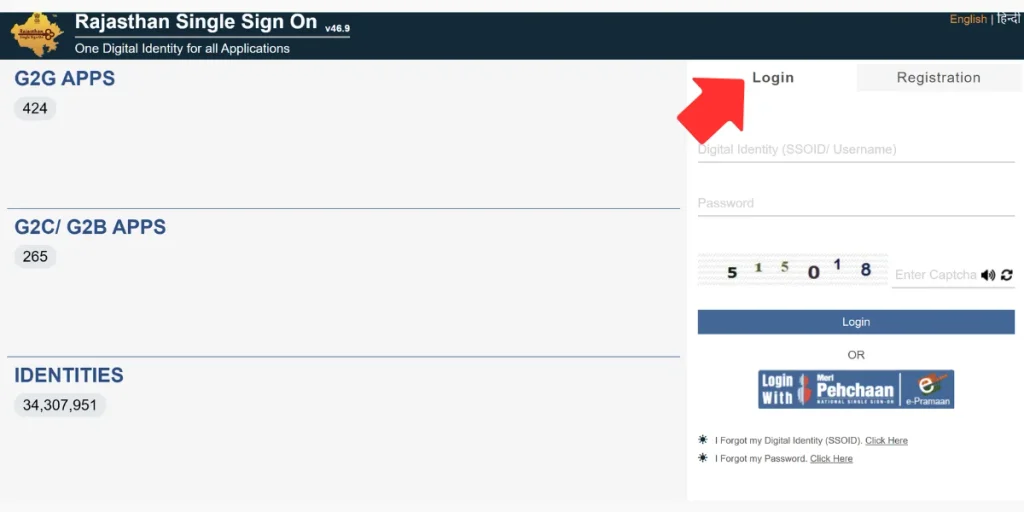
- Enter Your Login Details: On the SSO login page, enter your registered username, mobile number, email address, or SSO ID along with your password.
- Click on “Login”: After entering the required details, click the “SSO Login” button to continue.
- Access Your Account: If your login details are correct, you will be successfully signed in and can access your personalized SSO dashboard and available services.
Purpose of SSO ID Login
The main purpose of the Rajasthan SSO Portal is to provide government services through a single digital platform. It makes services easier, faster, and more convenient for users. The system helps reduce paperwork, improves transparency, and allows people to access different services online without visiting multiple government offices.
Benefits of SSO ID Login Rajasthan
- One ID for Multiple Services – Use a single account to access various government services and portals.
- Saves Time and Effort – Users do not need to manage separate usernames and passwords for different services.
- Better Security – Secure SSO ID Login and authentication help protect account and personal information.
- Greater Transparency – Digital processes can reduce paperwork, manual errors, and unnecessary delays.
- Easy-to-Use Dashboard – A personalized dashboard allows users to access and manage available services from one place.
Who Can Use Rajasthan SSO ID?
- Rajasthan Citizens – Residents can create and use an account through available identity options such as Aadhaar or Jan Aadhaar.
- Government Employees – Eligible government employees can access SSO services using their employee-related credentials.
- Business Users – Businesses and organizations can use the portal to access relevant government and business-related services.
Services Available After SSO ID Login
Government Services
- Employment: Apply for jobs, check application status, and receive employment-related updates.
- Education: Access admission services, scholarships, examination information, and other educational facilities.
- Health: Use available online health services, government health schemes, and related facilities.
- Finance: Access e-Mitra services, bill payments, and other financial or citizen services.
- Land Records: Use available services related to land records, registration, mutation, and land-use information.
- Transport: Access vehicle registration, driving licence, permits, and other transport-related services.
- Police: Use available online police services, complaint facilities, and application tracking.
- Revenue: Access property tax, land revenue, and other revenue-related services.
- Social Welfare: Apply for or manage pensions, welfare schemes, and other social benefits.
- Agriculture: Find agricultural schemes, subsidies, loans, and other farmer-related services.
Specific Services
- Arms Licence: Submit applications and check the status of eligible licence-related services.
- Building Plan Approval System (BPAS): Access digital services related to building plan approval.
- Disaster Management: Get important information, alerts, and resources during emergencies.
- Drug Licence: Apply for eligible drug licence services and track applications or renewals.
- GST Services: Access available GST-related registration, filing, and payment facilities.
- Litigation Tracking: Check the status and details of eligible legal cases online.
- Circuit House Management System: Access online booking and management facilities for circuit houses.
Other Services
- e-Governance: Access various citizen-focused government services through a digital platform.
- e-Learning: Find online learning resources, courses, and skill-development opportunities.
- e-Commerce: Access available digital marketplace and online commerce-related services.
- e-Library: Explore digital books, study materials, and other online educational resources.