
SSO ID Rajasthan is an online Single Sign-On (SSO) platform launched by the Government of Rajasthan to help citizens access various government services through a single account. Users can sign in with one set of login details instead of creating separate usernames and passwords for different services. This portal makes it easier to use online government facilities, apply for schemes, and access essential services from one place. It also saves time and reduces the effort required to manage multiple accounts. In this guide, we will explain the SSO Portal Rajasthan, SSO ID Login, its key benefits, the registration process, and how citizens can use the platform to access available online services.
Login
Step-by-step login
Registration
Create your SSO ID
Forgot SSO ID
Recovery methods
Emitra
E-Mitra Services
What Is the SSO Rajasthan Portal?
The SSO Rajasthan Portal is an online platform developed by the Government of Rajasthan to help citizens access various government services in one place. It reduces the need to visit government offices for many online tasks. Users can visit the portal, sign in with their SSO ID Rajasthan, and use the services available through their account.
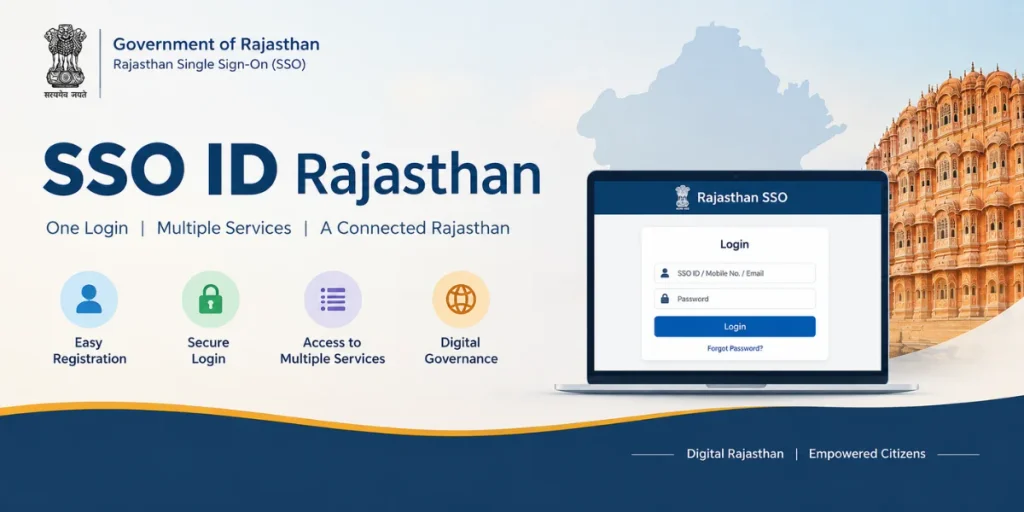
What Is SSO ID Rajasthan?
SSO ID Rajasthan stands for Single Sign-On Identity. It is a digital login system introduced by the Rajasthan government to make online government services easier and more convenient for residents. With a single account, users can access multiple services without creating separate login details for every platform.
The portal provides access to various online services, including e-Mitra, Bhamashah-related services, the Rajasthan State Pollution Control Board (RSPCB), the Public Health Engineering Department (PHED), and other participating government departments.
To create an account, users need to register through the official Rajasthan SSO website. During registration, they may be asked to provide the required details, depending on their selected registration method. After completing the process, they receive their login credentials, which they can use to sign in and access the services available on the portal.
SSO ID Rajasthan Overview
| Details | Information |
|---|---|
| Portal Name | Rajasthan SSO Portal |
| Full Form | Single Sign-On |
| Launched By | Government of Rajasthan |
| Main Purpose | Access multiple government services online |
| Official Website | https://sso.rajasthan.gov.in/ |
| Registration | Online |
| Login Method | SSO ID and Password |
| Available Users | Citizens, government employees, and businesses, depending on the service |
| Services Available | e-Mitra, government applications, and other departmental services |
| Main Benefits | Saves time and provides access to multiple services through one account |
| Registration Details | Depends on the selected registration method |
| Service Access | Online, subject to service availability |
Note: Always use the official Rajasthan SSO website for registration and login. Available services and eligibility requirements may vary by user category.
SSO ID Rajasthan Registration Process
The SSO ID Rajasthan Registration process can be completed online through the official Rajasthan SSO Portal. Users need to provide the required details, complete verification, and create their account. Follow these general steps:
- Visit the Official Website: Open the Rajasthan SSO Portal at https://sso.rajasthan.gov.in/.
- Click on Registration: On the homepage, select the “Registration” or “Register” option to start creating a new account.
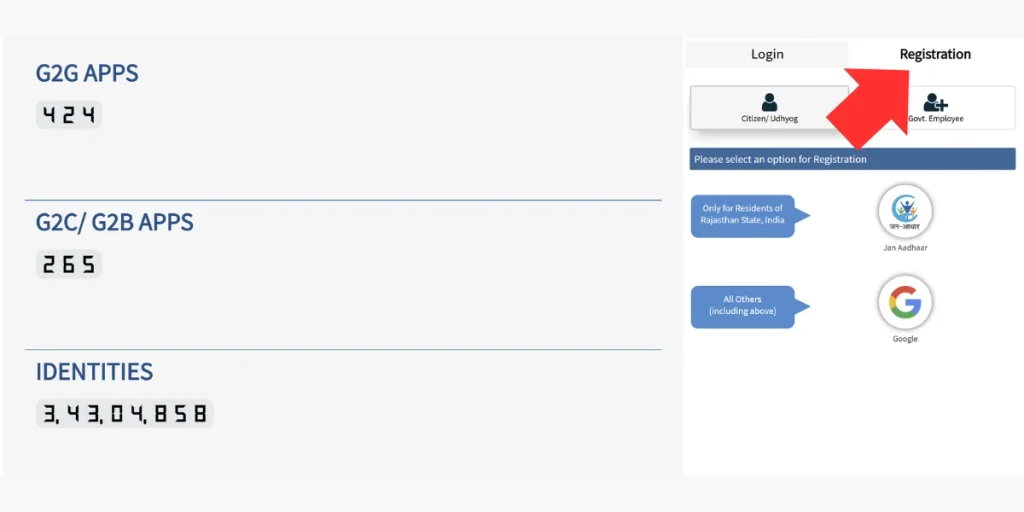
- Select the Registration Category: Choose the appropriate registration option based on your user type and the options currently available on the portal.
- Enter the Required Details: Fill in the requested information. Depending on the selected registration method, you may need to provide details such as:
- Name
- Mobile number
- Email address
- Aadhaar or other required identification details
- Complete Verification: Follow the instructions shown on the screen and complete the required verification. This may include OTP verification or another identity-verification method.
- Create Your Login Details: Set a secure password and complete any other required account information.
- Complete Registration: After successful verification and submission, your account will be created. You can then use your SSO ID Rajasthan and password to log in to the portal and access the available online services.
Note: The registration options and required information may change based on the current portal rules and user category. Always follow the instructions displayed on the official Rajasthan SSO Portal.
Who Launched SSO ID Rajasthan?
SSO ID Rajasthan was introduced by the Government of Rajasthan as part of its digital governance initiative. The platform was developed to make government services more accessible and convenient for citizens, businesses, and government employees. Its main objective is to simplify online processes, reduce paperwork, and allow users to access multiple government services through a single account.
How Can I Reset My SSO ID Password?
If you have forgotten your SSO ID Rajasthan password, you can use the password recovery option on the official Rajasthan SSO Portal. Follow these steps to reset your password:
- Visit the Official Portal: Open https://sso.rajasthan.gov.in/ in your browser.
- Open the Login Page: Click on the login option to access the sign-in form.
- Select Forgot Password: Find and click the password recovery option displayed on the login page.
- Choose a Recovery Method: Select one of the available recovery options, such as your registered mobile number, email address, or another supported method.
- Complete Verification: Enter the requested details and verify your identity by following the instructions provided on the portal.
- Set a New Password: Once your identity is verified, follow the on-screen instructions to create a new password.
- Log In Again: Return to the login page and use your SSO ID and new password to access your account.
Note: The available recovery methods may vary. Follow the options displayed on the official portal, and never share your OTP or password with anyone.
How to Recover a Forgotten SSO ID Rajasthan?
If you have forgotten your SSO ID, you can try to retrieve it through the official Rajasthan SSO Portal. Follow the steps below to find your registered SSO ID.
- Visit the Official Website: Open https://sso.rajasthan.gov.in/ in your browser.
- Open the Login Page: Click on the login option to access the sign-in page.
- Choose the Forgot SSOID Option: Look for the option to recover your forgotten SSO ID on the login page.
- Select a Recovery Method: Choose one of the recovery options provided by the portal, if available.
- Enter the Required Details: Provide the information requested, such as your registered mobile number or other identification details.
- Complete Verification: Follow the on-screen instructions to verify your identity. If an OTP is required, enter it in the designated field.
- Retrieve Your SSO ID: After successful verification, follow the instructions displayed on the screen to view or recover your registered SSO ID.
Note: Recovery options may change depending on the portal’s current facilities and your account type. Use only the official website and never share your OTP or other confidential information with anyone.
How to Login to SSO ID Rajasthan Portal?
Logging in to your Rajasthan SSO account is a simple online process. Follow the steps below to access your account:
- Visit the Official Portal: Open the official Rajasthan SSO website at https://sso.rajasthan.gov.in/.
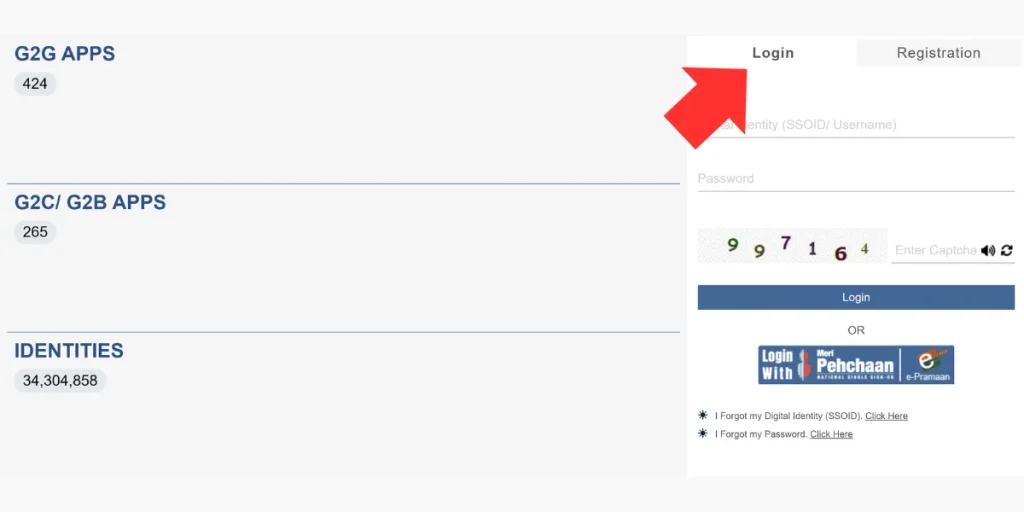
- Enter Your Login Details: On the login page, enter your registered SSO ID Rajasthan and password in the appropriate fields.
- Complete Verification: If the portal asks for an additional verification step, follow the instructions displayed on the screen.
- Click on SSO ID Login: After entering the required information, click the “SSO Login” button.
- Access Your Dashboard: If your login details are correct, you will be taken to your SSO dashboard, where you can access the government services available for your account.
What If You Forget Your Password?
If you cannot remember your password, select the “Forgot Password” option on the SSO login page. Follow the available recovery instructions and complete the required verification to create a new password.
Key Advantages of SSO ID Rajasthan
The SSO ID Rajasthan platform offers several benefits to citizens and government departments. It is designed to make online services easier to access while reducing the need for separate accounts and repeated paperwork.
For Citizens
- Convenient Access: Users can access multiple government services through a single account instead of managing different usernames and passwords.
- Saves Time: Many online applications and services can be completed from home, reducing the need to visit government offices.
- Easy to Use: The portal provides a centralized platform for accessing various participating government services.
- Digital Access: Citizens can use available online services through the portal without depending entirely on physical documents and office visits.
- Secure Login: Account-based access helps protect user information and provides a controlled way to access online services.
For Government Departments
- Improved Service Delivery: Digital processes can help departments handle applications and services more efficiently.
- Reduced Paperwork: Online systems reduce dependence on physical forms, records, and manual data entry.
- Better Management: Digital information can help departments manage applications and service requests more effectively.
- Greater Transparency: Online processes make it easier for users to track certain applications and services.
How to Manage Multiple SSO ID Rajasthan?
If you have accidentally created more than one SSO ID Rajasthan, managing multiple accounts can become confusing. Instead of trying to handle duplicate accounts on your own, you should contact the official SSO support team and follow the current account-management process.
- Log in to Your Account: Sign in to the SSO account you want to continue using.
- Open the Support Section: Look for the Help, Support, or Contact option available on the portal.
- Explain the Issue: Inform the support team that you have multiple SSO IDs and provide the required account details.
- Provide Verification Details: If requested, submit the necessary information or documents to confirm your identity.
- Wait for Verification: The concerned team will review your request and provide further instructions.
- Follow the Final Instructions: Complete the process according to the response provided by the official support team.
Important: Do not share your password, OTP, or other confidential login information with anyone. Account-related procedures can change, so always follow the latest instructions provided on the official Rajasthan SSO Portal.
Services Available Through SSO ID Rajasthan
The Rajasthan SSO platform provides access to numerous online services offered by different government departments and agencies. The exact services available to a user can depend on their account type, eligibility, and the department providing the service.
Government and Citizen Services
- Employment Services: Access eligible recruitment, application, and employment-related services.
- Education: Use available admission, scholarship, examination, and education-related services.
- Health Services: Access participating health-related government services and applications.
- e-Mitra Services: Use various citizen services provided through the e-Mitra ecosystem.
- Finance and Payments: Access eligible bill payment and other financial services available through participating departments.
- Land and Revenue: Use available land, property, and revenue-related online services.
- Transport: Access eligible vehicle, driving licence, and transport-related services.
- Police Services: Use participating police-related online services and applications.
- Social Welfare: Access eligible pension, welfare, and social-security services.
- Agriculture: Find participating agriculture-related schemes, applications, and farmer services.
Other Digital Services
Depending on the user’s profile and available departmental integrations, the portal may also provide access to:
- Online government applications
- Digital certificates and documents
- Skill and learning-related services
- Business and enterprise services
- Department-specific portals
- Online application and status-tracking facilities
Important Services and Applications
Some departments may provide specialized services through the SSO platform, such as online applications, approvals, registrations, renewals, and status tracking. Availability can change as departments add, remove, or update their services.
Note: The services listed above are a general overview and are not a complete list. The availability of a particular service depends on the concerned Rajasthan government department, user category, and current portal integrations. For the latest information, users should check the official Rajasthan SSO Portal.
Eligibility Criteria for SSO Login Rajasthan
The eligibility and registration requirements for SSO ID Login Rajasthan can vary depending on the type of user and the registration method selected. Citizens, government employees, and businesses may have different options available on the portal.
Generally, applicants should have the required identification or registration details for their selected category. Depending on the registration option, users may need:
- Rajasthan Residency: Citizens registering as residents may need to meet the applicable Rajasthan residency requirements.
- Valid Identification: An Aadhaar Card, Jan Aadhaar, or another accepted identification document may be required.
- Mobile Number: A valid mobile number may be needed for OTP verification and account-related communication.
- Email Address: An email address may be required for certain registration methods or services.
- Other Registration Options: The portal may provide different registration methods based on the user’s category and eligibility.
There is not necessarily a single age or document requirement for every SSO account. Users should check the registration options shown on the official portal before starting the process.
Benefits of SSO ID Rajasthan
The Rajasthan SSO Portal provides a convenient way to access multiple participating government services through a single account. Some of its key benefits include:
- Single Login: Users can access multiple available services without maintaining separate SSO login accounts for every participating portal.
- Saves Time: Online access reduces the need to repeatedly enter login details or visit government offices for services that are available digitally.
- Convenient Access: Various government services can be accessed from one centralized platform.
- Digital Services: Users can apply for and manage eligible online services according to their account type.
- Easy Account Management: A single account makes it easier to manage participating services and applications.
- Secure Access: SSO Login and verification features help provide controlled access to account-related information and services.
- Reduced Paperwork: Digital applications can reduce the need for physical forms and documents where online processing is available.
Overall, the SSO system helps make access to participating Rajasthan government services more convenient and organized for eligible users.
Note: Registration methods, eligibility requirements, available services, and verification steps may change when the portal is updated. Always check the official Rajasthan SSO Portal for the latest information before registering or logging in.
Note: Always use the official Rajasthan SSO website for login and account recovery. Never share your password or OTP with anyone.
How to Update Jan Aadhaar ID Number in SSO ID Rajasthan?
If you need to link or update your Jan Aadhaar details in your SSO account, use the options available in the official Rajasthan SSO Portal. The exact process may vary depending on your account type and the current portal interface.
- Log In to Your SSO Account: Visit the official Rajasthan SSO Portal and sign in using your SSO ID and password.
- Open Your Profile: After logging in, go to the Profile, Account, or relevant settings section available on your dashboard.
- Look for Jan Aadhaar Details: Check for the section where Jan Aadhaar or other identity-related information can be added or updated.
- Enter the Required Information: If an update option is available, enter your correct Jan Aadhaar ID and any other details requested by the portal.
- Complete Verification: Follow the instructions shown on the screen and complete any required OTP or identity verification.
- Save the Changes: Submit the information and wait for the portal to confirm whether the details have been updated successfully.
Additional Tips
- Check the Details Carefully: Make sure the Jan Aadhaar information you enter is correct before submitting it.
- Follow Current Instructions: The location of profile and update options may change when the portal is updated.
- Use the Official Portal: Always update personal information through the official Rajasthan SSO website.
- Contact Support: If you cannot find the required option or receive an error, contact the official SSO support team for guidance.
Important Notes
Do not share your password, OTP, or other confidential account information with anyone. If the Jan Aadhaar update option is not available in your account, follow the latest instructions provided by the official SSO support team.
SSO ID Rajasthan Contact Number
| Details | Information |
|---|---|
| Helpline Number | 1800 180 6565 |
| Official Portal | Rajasthan SSO Portal |
| Support | Use the help or support options available on the official portal |
Note: Contact details and support procedures can change. Verify the latest information on the official Rajasthan SSO Portal before contacting support.
Frequently Asked Questions (FAQs)
1. What is SSO ID Rajasthan?
SSO ID Rajasthan is a digital account that allows eligible users to access multiple Rajasthan government services through a single login. It helps reduce the need to maintain separate accounts for different online services.
2. How can I register for an SSO ID Rajasthan?
To register, visit the official Rajasthan SSO Portal and select the registration option. Choose the applicable registration category, provide the required information, complete verification, and follow the instructions to create your account.
3. How can I log in to my SSO ID Rajasthan account?
Visit the official Rajasthan SSO Portal and enter your registered SSO ID Rajasthan and password. Complete any verification requested by the portal and click the Login button to access your dashboard.
4. What should I do if I forget my SSO ID password?
If you forget your password, select the Forgot Password option on the SSO login page. Follow the available recovery instructions and complete the required verification to reset your password.
5. How can I recover a forgotten SSO ID Rajasthan?
You can use the SSO ID Rajasthan recovery option available on the official portal. Follow the instructions provided and complete the required verification using the recovery details linked to your account.
6. How can I update my Jan Aadhaar ID in SSO?
Log in to your SSO account and check your profile or account settings for the Jan Aadhaar section. If an update option is available, enter the required details, complete verification, and submit the changes.
7. Can I access multiple government services with one SSO ID?
Yes. The SSO platform is designed to provide access to multiple participating Rajasthan government services through a single account. The services available may depend on your user category and eligibility.
8. What is the SSO ID Rajasthan helpline number?
The helpline number listed for SSO support is 1800 180 6565. Since contact details can change, users should verify the latest information on the official Rajasthan SSO Portal.