
Lost access to your Rajasthan SSO account? If you have Forgot SSO ID, forgotten your password, or cannot remember either, you can recover your account using the available recovery options. This guide explains the different ways to retrieve your SSO ID or reset your password, including the quick SMS recovery method.
Free Recovery Process
Recovering your SSO ID or password is completely free. No additional charges are required for the account recovery process.
Quick SMS Recovery
You can retrieve your SSO ID through SMS using the registered mobile number. This option can be useful when you do not have internet access.
Registered Mobile Number Required
A mobile number linked with your SSO account may be required for OTP-based verification and other recovery methods.
Your Data Remains Safe
Recovering your SSO ID or resetting your password does not remove your existing account data or services.
Choose What You Need to Recover
The Rajasthan Single Sign-On (SSO) Portal offers different options to help users regain access to their accounts. If you have Forgot SSO ID details or cannot remember your password, you can choose the recovery option that matches your situation.
Forgot SSO ID
If you remember your password but cannot recall your SSO ID, you can use the available recovery method to retrieve your Digital Identity. Follow the instructions provided on the portal and complete the required verification.
Forgot SSO ID Password
If you know your SSO ID but have forgotten your password, select the password recovery option. You may need to verify your registered mobile number or provide other required details before creating a new password.
Your Account Data Is Safe
The recovery process is designed to restore access to your existing account. Recovering your SSO ID or resetting your password does not normally remove your account information, linked services, application history, or saved documents.
Part 1 — How to Recover Your Forgot SSO ID?
If you cannot remember your Rajasthan SSO ID, there are two ways to recover it. You can use the official SSO portal or retrieve it through SMS without an internet connection.
Method 1 — Recover SSO ID Through the SSO Portal
Step 1: Visit the Official SSO Portal
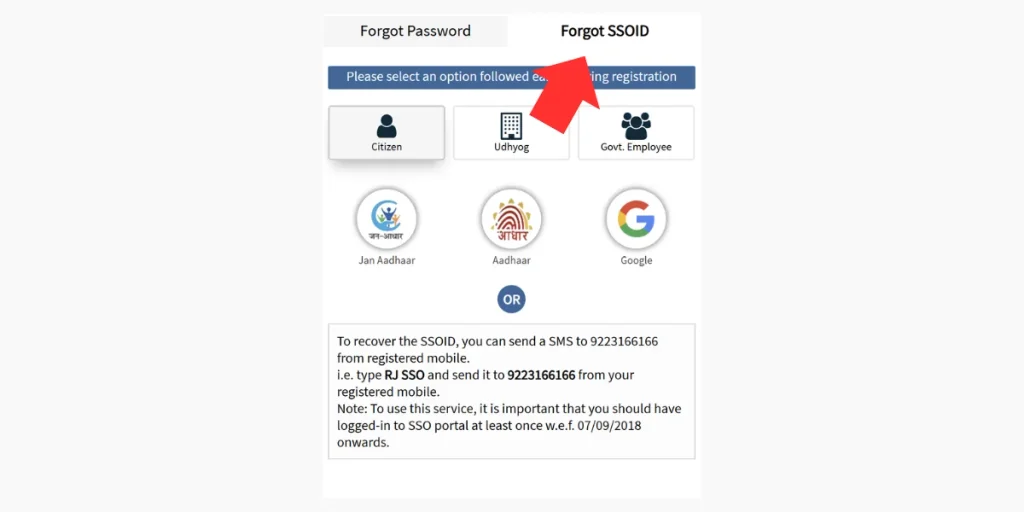
Open your browser and visit the official Rajasthan SSO website at sso.rajasthan.gov.in. On the login page, find the option “Forgot SSO ID” Click Here” below the login section.
Step 2: Select Your Registration Category
Choose the registration category that you used when creating your SSO account.
Citizen
- Jan Aadhaar
- Aadhaar
Udyog (Business)
- Udyog Aadhaar
- SAN (Organisation Aadhaar Number)
Government Employee
- Select the SIPF option.
- Enter your SIPF number and password.
Step 3: Enter Your Details
Provide the information requested for your selected category, such as your Aadhaar number, Jan Aadhaar number, or other required details. The portal will verify the information you provide.
Step 4: Get Your SSO ID
After successful verification, your registered SSO ID may be sent to your registered mobile number or email address. Save the recovered ID securely for future use.
Method 2 — Recover SSO ID Through SMS
If you do not have internet access, you can use the SMS recovery option to retrieve your SSO ID.
SMS Format: RJ SSO
Send To: 9223166166
After sending the SMS, you should receive a reply containing your registered SSO ID, subject to the availability of the SMS recovery service.
Important Note
The SMS should be sent from the mobile number registered with your SSO account. Messages sent from an unregistered mobile number may not provide the requested SSO ID.
Part 2 — How to Reset Your Forgot SSO ID Password
If you remember your SSO ID but cannot recall your password, you can reset it using the available recovery options. Follow either of the methods below to regain access to your account.
Method 1 — Reset Password Through the SSO Portal
Step 1: Open the Password Reset Page
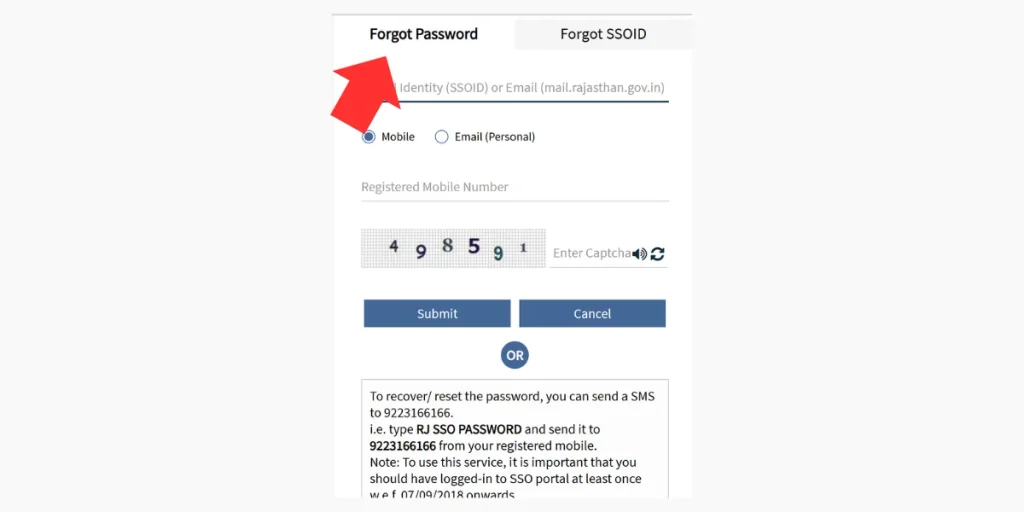
Visit the official Rajasthan SSO portal at sso.rajasthan.gov.in and select “Forgot Password” below the login form.
Step 2: Enter Your SSO ID and Email Address
Enter your SSO ID and the email address linked to your SSO account. Make sure the information is entered correctly before continuing.
Step 3: Select a Verification Option
Choose an available method to verify your identity and receive the password reset instructions:
- Mobile Number: A password reset link may be sent to your registered mobile number through SMS.
- Personal Email: The reset link may be delivered to your registered email address.
- Aadhaar ID / VID: If available, Aadhaar-based verification can be used through the mobile number linked with Aadhaar.
Step 4: Use the Reset Link
Open the password reset link received through SMS or email and create a new, strong password. If the link has a limited validity period, complete the process before it expires.
Step 5: Log In Again
After successfully creating your new password, return to the Rajasthan SSO login page. Enter your SSO ID and new password to access your account.
Method 2 — Reset Password Through SMS
Password recovery may also be available through SMS, allowing you to start the process without opening the website.
SMS Format: RJ SSO PASSWORD
Send To: 9223166166
You may receive password recovery instructions or confirmation on your registered mobile number, depending on the current SMS service.
Helpful Tip
If you do not receive the password reset message or email, check your spam or junk folder. Also make sure your registered mobile number and email address are active and that your browser is not blocking the recovery page or redirect.